Answering Questions On Dropped Columns
Howdy folks! Long time no write.
In this post, I will be answering a couple of questions from the previous posts about dropping columns.
A quick refresh
If you haven’t read the previous posts on this topic, here is the list:
What happens when we drop a column on a SQL Server table? Where’s my space?
How much Space can I expect to recover from a rebuild after dropping a column?
Comments
On the comments section of the “What happens when we drop a column on a SQL Server table? Where’s my space?” post, a reader asked:
Presumably, future inserts (after the column is dropped) won’t consume use space for the deleted column, though?
Also:
if a page is rewritten (e.g., due to a normal insert or update), is the space taken by a deleted column recycled then?
Ultimately, the question is whether the space taken by the dropped column will, in any way, be reused without rebuilding the table.
The short answer is
No, it won’t.
As a spoiler, I can share that:
- Dropping a column won’t reduce record size
- Inserts will still have the waste
- Updates won’t reuse the space
Let’s prove that
To start, you can pick the code on that post to create the table and insert the 50K records.
USE TableInternals
GO

DROP TABLE IF EXISTS Client
GO

CREATE TABLE Client
(
  Id      int NOT NULL identity(1,1),
  FirstName varchar(50),
  DoB     datetime
)
GO

;WITH
    L0 AS ( SELECT 1 AS c
            FROM (VALUES(1),(1),(1),(1),(1),(1),(1),(1),
                        (1),(1),(1),(1),(1),(1),(1),(1)) AS D(c) ),
    L1 AS ( SELECT 1 AS c FROM L0 AS A CROSS JOIN L0 AS B ),
    L2 AS ( SELECT 1 AS c FROM L1 AS A CROSS JOIN L1 AS B ),
    L3 AS ( SELECT 1 AS c FROM L2 AS A CROSS JOIN L2 AS B ),
    Nums AS ( SELECT ROW_NUMBER() OVER(ORDER BY (SELECT NULL)) AS rownum
              FROM L3
      )
  INSERT INTO Client ([FirstName], DoB)
  SELECT TOP (50000) 'Alex', '1900-01-01'
    FROM Nums
GO
AverageRecordSize
First, let’s check what the AverageRecordSize is on this table.
For that, you can run the DBCC SHOWCONTIG command.
This command “Displays fragmentation information for the data and indexes of the specified table or view.”
For more information, find the documentation here
.
/*
	Check the 'AverageRecordSize'
*/
DBCC SHOWCONTIG('dbo.Client') WITH TABLERESULTS
GO

We can see that the value is 27.
NOTE: Remember that, for simplicity, all records here are similar (have the same values), and that is why the minimum, average and maximum record size is the same.
Now, let’s drop the column
/*
	Let's drop our DoB column
*/
ALTER TABLE Client
 DROP COLUMN DoB
GO
and check the ‘AverageRecordSize’ again
/*
	Check the 'AverageRecordSize'
*/
DBCC SHOWCONTIG('dbo.Client') WITH TABLERESULTS
GO
I won’t put a picture here, because it’s the same as before.
It is still 27. Also, as shown in the previous posts, the content of the page still shows references to the dropped column.
Inserting new records
To answer the question if new records won’t consume space by the dropped column, we can insert a new record and check the content of the page for that record.
INSERT INTO Client ([FirstName])
SELECT 'Alex'
Check the content of the page. First we will need to pick the page number.
DBCC IND ('TableInternals', 'Client', 1);
Get the last value of the PagePID column.
Replace the <PagePID> with that number in the script below and run it
DBCC TRACEON (3604);
GO

DBCC PAGE ('TableInternals', 1, <PagePID>, 3);
GO
There will be a lot of text; you can scroll to the bottom, so we can check what we want.
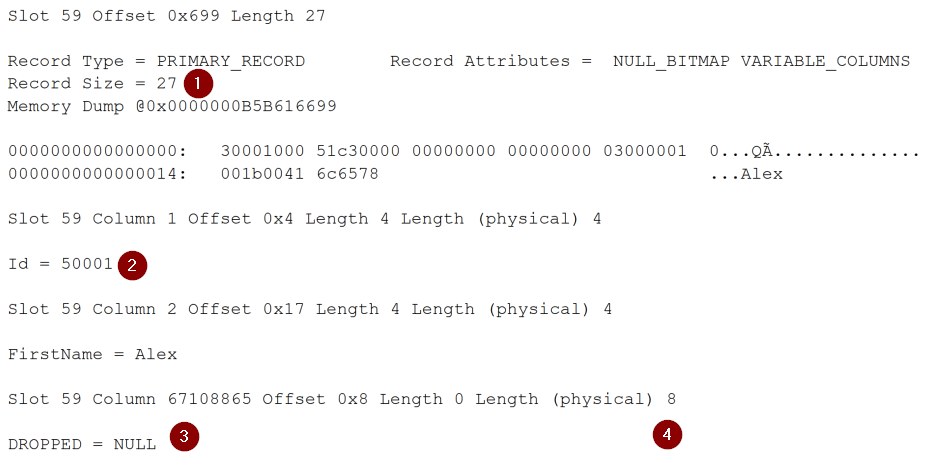
The new record has the same size (1), and you can see that it is the new record because it has the Id = 50001 (2), and besides the dropped column (3), it still occupies 8 bytes (4).
But, let’s check, once again, the results of DBCC SHOWCONTIG because, at this point, if a new record was inserted and it has “one less column of data”, it should be smaller, right?

No, it is still 27.
This also answers the second question that was related to when a page is rewritten (e.g., due to a normal insert or update), if the space will be recycled. As we have just shown, it won’t.
Another reader asked
If we remove all the rows that contained the columns that was dropped, while adding new rows that don’t use the dropped column, will the space eventually be reclaimed?
First, I want to address here what seems to be a misconception.
When reading this comment, it seems the reader is expecting that after dropping a column, and when the engine needs to assign a new data page, that one will not have any reference to the dropped column.
As shown before, that isn’t true; the existing pages will still have it, and, even if we add new records that will arrive on a new allocated page, the mention of the dropped column still appears there.
It’s important to know that the structure of each data page is the same across the table, and what dictates that is the table metadata. As we saw in the Identify Tables With Dropped Columns
post, we can use some internal views to check if there are any dropped columns (identified as is_dropped).
Until we rebuild the table, that metadata will be there, and every time a new data page is allocated and written, it will have that waste added.
Here it is an easy way to prove that
Let’s DELETE all the records, check the MinimumRecordSize and add some data again. This way, we will have a bunch of new pages and, if those were different, the MinimumRecordSize would be smaller.
/*
    DELETE all records
*/
DELETE FROM dbo.Client
Now let’s check the metrics about the records’ size once again:
/*
	Check the 'AverageRecordSize'
*/
DBCC SHOWCONTIG('dbo.Client') WITH TABLERESULTS
GO

It’s 0 (zero) as we don’t have any record.
If adding new data pages with new records that are now just a combination of the ID and FirstName columns, that would mean that at least the MinimumRecordSize should be different than 27, right?
Let’s insert 50K new records (note that we no longer have the DoB column)
/*
	Insert some records
*/
;WITH
    L0 AS ( SELECT 1 AS c
            FROM (VALUES(1),(1),(1),(1),(1),(1),(1),(1),
                        (1),(1),(1),(1),(1),(1),(1),(1)) AS D(c) ),
    L1 AS ( SELECT 1 AS c FROM L0 AS A CROSS JOIN L0 AS B ),
    L2 AS ( SELECT 1 AS c FROM L1 AS A CROSS JOIN L1 AS B ),
    L3 AS ( SELECT 1 AS c FROM L2 AS A CROSS JOIN L2 AS B ),
    Nums AS ( SELECT ROW_NUMBER() OVER(ORDER BY (SELECT NULL)) AS rownum
              FROM L3
      )
  INSERT INTO dbo.Client ([FirstName])
  SELECT TOP (50000) 'Alex'
    FROM Nums
GO
And let’s check the MinimumRecordSize again
/*
	Check the 'AverageRecordSize'
*/
DBCC SHOWCONTIG('dbo.Client') WITH TABLERESULTS
GO

It’s still 27! So, we keep dragging those 8 bytes (the datetime column) on every single record.
What about the TRUNCATE TABLE instead of a DELETE?
I will leave that one for you to test. However, as another spoiler, I can tell you it won’t make a difference either.
Wrap up
If you drop columns from tables and the space that is and will still be used (by current and new records) is too much, and you want to get rid of that, you need to rebuild your HEAP/CLUSTERED INDEX
Thanks for reading!