Last night, I received Adam Machanic’s ( b | t ) newsletter “Announcing sp_whoisactive v11.20: Live Query Plans”.

For those who don’t know about it, sp_WhoIsActive is a stored procedure that provides detailed information about the sessions running on your SQL Server instance. It is a great tool when we need to troubleshoot some problems such as long-running queries or blocking. (just two examples)

This stored procedure works on any version/edition since SQL Server 2005 SP1. Although, you only will be able to see the new feature (live query plans) if you run it on SQL Server 2016 or 2017.
Continue reading

Today I will write just a short blog post to do a quick reminder!

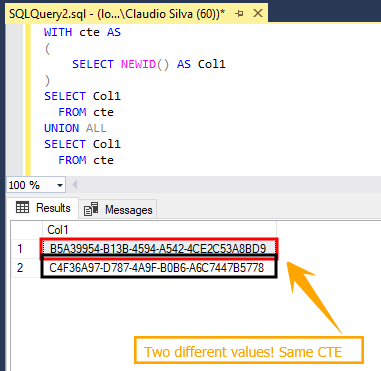
I still hear a lot of people suggesting CTEs because they think it works like a temporary table (you populate the table and then it can be/is reutilized).

It doesn’t!

From de documentation :

Specifies a temporary named result set, known as a common table expression (CTE).

Maybe they are focusing on the “temporary” word.

Continue reading

Before I complete my question let me provide context.

I’ve received an alert saying that a specific database could not allocate a new page (disk was full)

The message that you will see on the SQL Server Error log is:

Could not allocate a new page for database ’’ because of insufficient disk space in filegroup ‘’. Create the necessary space by dropping objects in the filegroup, adding additional files to the filegroup, or setting autogrowth on for existing files in the filegroup.

Continue reading

(TSQL2sDay)

This month’s T-SQL Tuesday is brought to us by my good friend Rob Sewell ( b | t ). Together “Let’s get all Posh – What are you going to automate today?”

I have written some blog posts on how I use PowerShell to automate mundane tasks or some other more complex scenarios like:   Find and fix SQL Server databases with empty owner property using dbatools PowerShell module  or Have you backed up your SQL Logins today?   or even using ReportingServicesTools module for deploy reports - SSRS Report Deployment Made Easy – 700 times Faster .

Continue reading

I was using open source PowerShell module dbatools ( GitHub repository ) to get the list of SQL Server services I have on a bunch of hosts so I could confirm if they are in “running” state.

– Quick note – For those who don’t know, dbatools is a module, written by the community, that makes SQL Server administration much easier using PowerShell. Today, the module has more than 260 commands. Go get it and try it! If you have any doubt you can join the team on the #dbatools channel at the Slack - SQL Server Community . – Quick note –

Continue reading