This article was initially posted on SQLServerCentral @ 2020-08-18. It was interesting some comments I read about it, mainly why people still use WITH ENCRYPTION when it’s simple to overcome this when we have the right permissions.

SQL Server offers an option to encrypt the code of your modules when using the WITH ENCRYPTION syntax. This allows to hide/obfuscate the modules’ code and thus keep away from prying eyes. It’s often used to protect business rules since it allows you to protect some intellectual property.
Continue reading

Whether it’s in our personal lives or the professional one, we do have checklists for certain tasks.

On the professional level, it can be purely technical like SQL Server installation, configuration or even uninstall, but they can also be not so technical like when a colleague join the team and someone needs to request permissions to access the company’s tools (such as ticketing/incidents/VPN/etc).

What about when a colleague leaves the company?

What is your checklist for this situation? At first, and the most obvious is to “rollback” the things done when that person joined the company. For instance:

Continue reading

This was initial posted on SQL Server Central articles .

As one of dbatools’ first members, I’ve been using it for years and it’s really my goto tool. This task was no different!

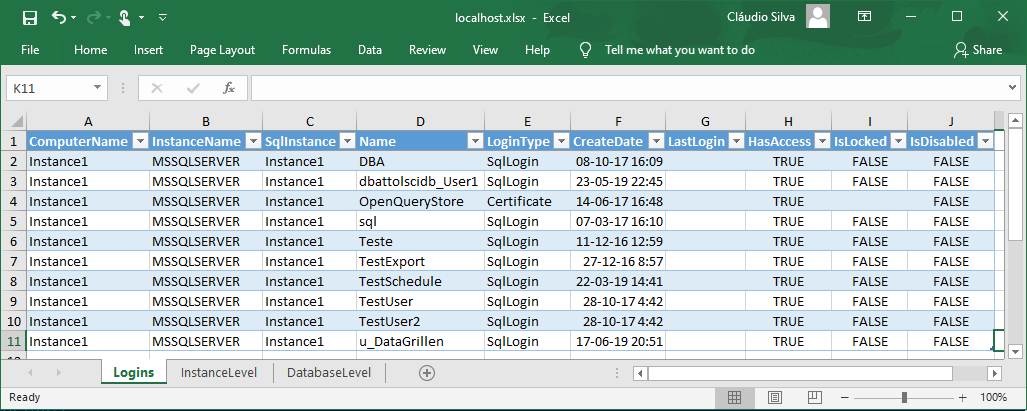
Today’s tip and trick using dbatools is about generating an Excel workbook that contains lists of SQL Server roles and its members.

The Usefulness of these Reports

These reports are especially useful when performing tech-refreshes (migrating from an old version to a newer one) and you want to do some housekeeping. For example, finding logins that should be part of a role and they are not. Once you know there are problems, you decided to do a double-check on the whole list.

Continue reading

This month’s (#127) T-SQL Tuesday is brought by B | T ) and he asked about Non SQL Tips and tricks. (TSQL2sDay)

As a Windows user I know there are lots of shortcuts and small hacks, that I love, which make my life much easier! Here is my small contribution:

Windows tips & tricks and shortcuts

  • WIN + X -> to access a lot of management stuff in a quick way
  • WIN + V -> If you looking for a clipboard manager (keep multiple entries) since Windows 10 (build 1809) we can have it natively. However, I keep using ClipX .
  • WIN + [0-9] -> The number is linked to the position of the apps on your taskbar.
  • WIN + . -> Big fan of emoticons? Select one from this list
  • Open PowerShell (or cmd) console from a windows explorer window. How many times have you wanted to jump to the PowerShell console already on a specific folder that you have already open on the windows explorer? Just type on the address bar “PowerShell” and a new PowerShell session will open right on that location.

Open “Add or Remove programs”

A way to open the “Add or Remove programs” menu quicker, you can SHIFT + DEL on the shortcut (example: Docker Desktop) on desktop and the prompt popup will have there a link to this option. addremoveprogramshortcut

Continue reading

We have seen how we can export and save the results to a folder and commit them to a GIT repository on my last blog post Backup your SQL instances configurations to GIT with dbatools – Part 1 . At the end of that post, I have mentioned that I would write about how we can lower down the execution times of our script by leveraging on parallelism.

Going parallel

When we need to manage dozens of servers/instances, even with automated scripts sometimes we would like that our script finishes faster. There are multiple reasons that a sequential (one-by-one) run takes longer. Few examples I have hit in the past:

Continue reading